S91BOX RM1 Purchase Collect Cards
S91BOX RM1 Purchase Collect Cards
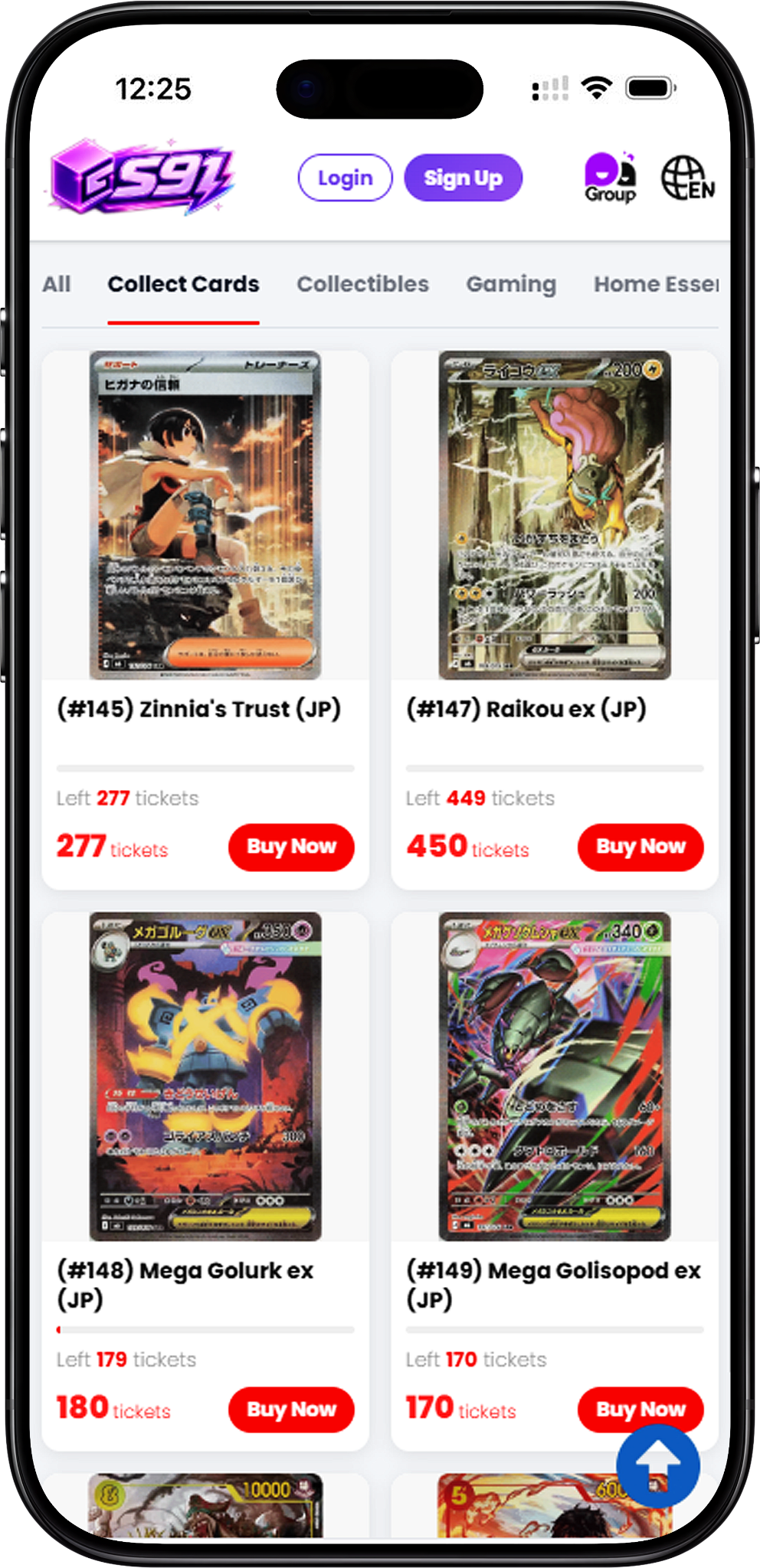
Trading Card Products Available with Tickets
The S91BOX RM1 Purchase Collect Cards category focuses on collectible trading cards from Pokémon and ONE PIECE. Each product page displays the individual card, its Ticket requirement and available product information so users can review a Collect Cards item before proceeding with a purchase.
Collect Cards Available in RM1 Purchase
Pokémon and ONE PIECE Collect Cards
The complete Collect Cards RM1 Purchase selection includes (#145) Zinnia’s Trust (JP), (#146) Aarune (JP), (#147) Raikou ex (JP), (#148) Mega Golurk ex (JP), (#149) Mega Golisopod ex (JP), (#150) Marshall.D.Teach (Alternate Art), (#151) Portgas.D.Ace (Alternate Art), and (#152) Zehahahahaha! (Alternate Art). The selection combines Japanese Pokémon cards with alternate-art ONE PIECE cards in one dedicated RM1 Purchase category.
Pokémon Collect Cards
The Pokémon selection consists of (#145) Zinnia’s Trust (JP), (#146) Aarune (JP), (#147) Raikou ex (JP), (#148) Mega Golurk ex (JP), and (#149) Mega Golisopod ex (JP). Open the corresponding product to review its description and current purchase information.
ONE PIECE Collect Cards
The ONE PIECE selection consists of (#150) Marshall.D.Teach (Alternate Art), (#151) Portgas.D.Ace (Alternate Art), and (#152) Zehahahahaha! (Alternate Art). Each card has its own product page showing the information associated with that RM1 Purchase item.
How S91BOX RM1 Purchase Works
Step 1 – Choose a Collect Cards Product
Browse the available Collect Cards products and open the card you want to purchase. The product page displays the card image together with its current RM1 Purchase information.
Step 2 – Check the Ticket Requirement
Review the number of Tickets required for the selected product. The product interface identifies the purchase rate as RM1 / ticket, while the required Ticket quantity depends on the individual product.
Step 3 – Select the Purchase Quantity
Use the quantity controls on the product page to select the number you want to purchase before proceeding.
Step 4 – Select Buy Now
After reviewing the product and quantity, select Buy Now to proceed to the payment confirmation stage.
Step 5 – Review and Confirm Payment
The confirmation panel displays the Wallet Balance, Pay with Balance option and total amount for the selected purchase. Review the displayed information before selecting Pay Now.
Product Details and Ticket Information
Sold, Total and Remaining Quantity
Each Collect Cards product page can display the number of units Sold, the Total quantity and the number Remaining. This information helps users check the current availability of the selected RM1 Purchase product.
Product Description
A dedicated Description section provides information about the selected card. The displayed details vary by product, allowing users to review the individual collectible before purchasing.
Fairness, Authenticity and Delivery Information
The Collect Cards product interface displays 100% Fair, 100% Authentic and Free Delivery information alongside the selected product. Users should refer to the individual product page for the information currently displayed before making a purchase.
Calculation Tutorial
A Calculation Tutorial section is available on the RM1 Purchase product interface for users who want to review the calculation information associated with the purchase.
Exchange Records and Lucky Winners
Review Exchange Records
The Exchange Records section shows available purchase activity for the selected RM1 Purchase product. Where records are available, users can review the displayed purchase information directly from the product page.
View Lucky Winners
The Lucky Winners section provides winner information associated with RM1 Purchase. Users can select View All Winners when available to access the broader Winners area.
Winners Information
The Winners area can display information such as the product, masked winner name, Ticket number, number of Tickets purchased and draw time. The available records depend on the completed campaigns shown by S91BOX.
Get RM1 Purchase Tickets from Season Pass
Lucky Draw XP to Season Pass Tickets
S91BOX connects Lucky Draw, Season Pass and RM1 Purchase through its reward progression. Participating in Lucky Draw can accumulate XP. The accumulated XP can be used to claim Season Pass progress and its available rewards, including Tickets.
Use Tickets for RM1 Purchase Products
Tickets claimed through Season Pass can be accumulated for RM1 Purchase. Once you have enough Tickets for the product you want, those Tickets can be used toward purchasing the selected RM1 Purchase item. Different products can require different Ticket amounts, so check the individual product before proceeding.
S91BOX RM1 Purchase Collect Cards FAQ
What is S91BOX RM1 Purchase Collect Cards?
S91BOX RM1 Purchase Collect Cards is the trading card category of RM1 Purchase, featuring selected Pokémon and ONE PIECE collectible cards that can be purchased using Tickets.
Which cards are available in Collect Cards?
The category includes Zinnia’s Trust (JP), Aarune (JP), Raikou ex (JP), Mega Golurk ex (JP), Mega Golisopod ex (JP), Marshall.D.Teach (Alternate Art), Portgas.D.Ace (Alternate Art), and Zehahahahaha! (Alternate Art).
How do I get Tickets for RM1 Purchase?
Participate in Lucky Draw to accumulate XP, use the XP toward Season Pass progress and claim available Season Pass rewards such as Tickets. Accumulated Tickets can then be used for eligible RM1 Purchase products.
How many Tickets do I need for a Collect Cards product?
The required amount varies by product. Open the individual Collect Cards product page and check its displayed Ticket requirement and current availability before purchasing.
Can I check how many products are still available?
Yes. Individual product pages can show Sold, Total and Remaining quantities, allowing you to review the current availability displayed for that product.
Can I view previous RM1 Purchase activity?
Yes. The product interface includes Exchange Records and Lucky Winners sections where available records related to purchases and winners can be reviewed.
What information should I check before buying?
Review the selected card, product description, required Tickets, Sold, Total and Remaining quantities, and the information displayed on the product page before selecting Buy Now.
Explore S91BOX RM1 Purchase Collect Cards
Browse the available Pokémon and ONE PIECE Collect Cards, check the Ticket requirement for your selected product and use your accumulated Tickets toward an RM1 Purchase.