S91BOX Top Up
How to Top Up on S91BOX
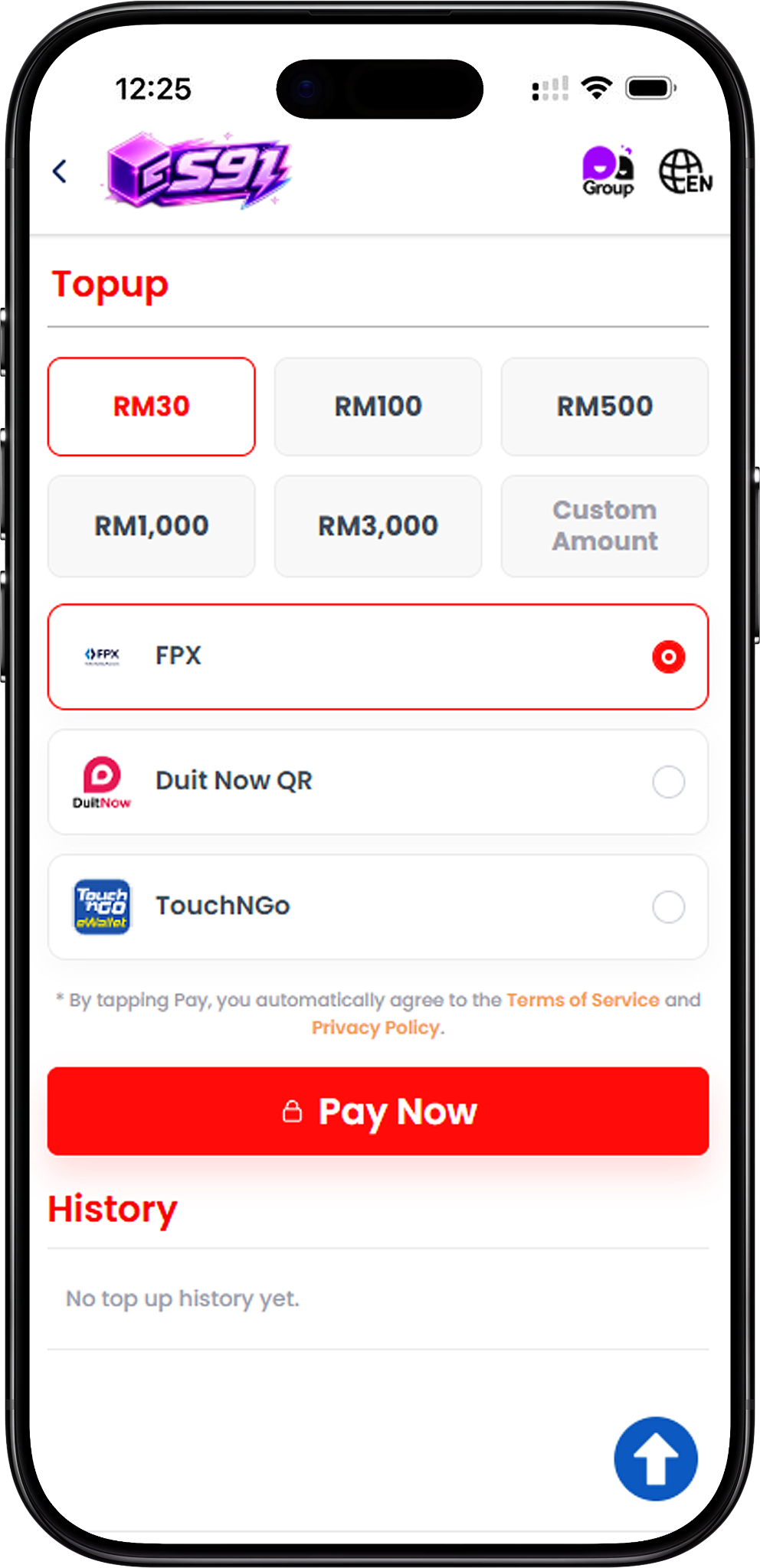
Step 1 – Choose a Top Up Amount
Open the S91BOX Top Up page and select one of the displayed amounts: RM30, RM100, RM500, RM1,000 or RM3,000. A Custom Amount option is also available when a different amount is required.
Step 2 – Select a Payment Method
Choose an available payment method. S91BOX currently displays FPX, DuitNow QR and Touch ‘n Go as top up options.
Step 3 – Tap Pay Now
After confirming the amount and payment method, select Pay Now to proceed to the relevant payment interface. By proceeding with payment, the Top Up page states that users agree to the applicable Terms of Service and Privacy Policy.
Step 4 – Complete the Payment
Follow the instructions displayed by the selected payment provider. The exact process differs between FPX online banking, DuitNow QR and Touch ‘n Go.
Step 5 – Review Your Top Up History
Return to the Top Up page after completing the payment and use the History section to review available top up records.
S91BOX Top Up with FPX
Step 1 – Select FPX
Choose your required top up amount, select FPX as the payment method, and tap Pay Now. The payment flow displays the deposit amount together with a reference number and transaction time.
Step 2 – Choose an Online Banking Option
On the FPX payment page, select an available online banking option. The displayed options include Maybank, RHB Bank, Public Bank, AmBank, Hong Leong Bank, CIMB Bank, Affin Bank and Bank Simpanan Nasional.
Step 3 – Continue Through Your Bank
Proceed using the selected bank and follow the payment instructions provided through the payment interface. Ensure that the bank account being used has online payment processing enabled.
Step 4 – Complete the Transaction Once
Follow the payment page instructions carefully and avoid submitting the payment more than once. The FPX interface also advises users not to refresh the browser while the transaction is being processed.
Step 5 – Keep the Reference Number
Take note of the displayed reference number for the transaction. The payment page advises keeping this number in case Customer Service assistance is required later.
S91BOX Top Up with DuitNow QR
Step 1 – Select DuitNow QR
Choose the required S91BOX Top Up amount, select DuitNow QR, and proceed with Pay Now.
Step 2 – Open the DuitNow QR Payment
The payment page displays a DuitNow QR code, the transaction reference number, order amount and the amount to pay. A countdown is also displayed for the QR code.
Step 3 – Scan the QR Code
Use a supported payment application to scan the displayed DuitNow QR code and pay the exact amount shown on the payment page.
Step 4 – Complete the QR Payment Once
The payment instructions state that the QR code should only be scanned and paid once. Do not reuse the same QR code for another payment.
Step 5 – Complete Payment Before Expiry
Complete the transaction while the QR code and order remain valid. The displayed instructions advise users not to proceed if the QR code or order has expired and not to go back or refresh during the payment process.
S91BOX Top Up with Touch ‘n Go
Step 1 – Select Touch ‘n Go
On the S91BOX Top Up page, choose the required amount and select Touch ‘n Go as the payment method before proceeding with Pay Now.
Step 2 – Confirm the Payment Amount
The payment interface displays the amount, date, order ID and the payee information. Review the displayed transaction details before continuing.
Step 3 – Select the E-Wallet
Under Select Payment Method, choose the E-Wallet option and select Touch N Go from the available e-wallet selection.
Step 4 – Proceed with Payment
Select the payment button showing the MYR amount and continue through the payment process provided for Touch ‘n Go.
S91BOX Top Up Amounts
Preset Top Up Amounts
The S91BOX Top Up page provides preset selections of RM30, RM100, RM500, RM1,000 and RM3,000, allowing users to choose an amount directly before selecting their preferred payment method.
Custom Amount
A Custom Amount option is also displayed for users who need to enter a different top up amount instead of choosing one of the preset selections.
Check Your Top Up History
View Previous Top Up Records
The History section appears directly below the payment area on the S91BOX Top Up page. Users can return to this section to check available records of their top up activity.
No Top Up History Yet
When there are no available top up records, the History section displays “No top up history yet.”
Important Top Up Payment Notes
Check Transaction Details Before Paying
Review the top up amount and payment details before completing a transaction. When the payment provider displays an order ID or reference number, keep the information available until the payment process is complete.
Avoid Duplicate Payment Actions
Follow the instructions displayed on the selected payment page. For the shown FPX and DuitNow QR flows, users are specifically instructed to avoid repeated submissions or repeated QR payments.
Do Not Refresh During Supported Payment Flows
The displayed FPX and DuitNow QR payment instructions warn against refreshing or navigating back during the transaction process. Follow the instructions on the active payment page to avoid interrupting the payment.
Check QR Expiry
DuitNow QR transactions display an expiry countdown. Do not continue with payment after the QR code or associated order has expired.
S91BOX Top Up FAQ
What is S91BOX Top Up?
S91BOX Top Up is the platform section used to add funds by choosing a top up amount and completing payment through an available payment method.
What payment methods are available for S91BOX Top Up?
The S91BOX Top Up page shown provides FPX, DuitNow QR and Touch ‘n Go payment options.
What S91BOX Top Up amounts can I choose?
The displayed preset amounts are RM30, RM100, RM500, RM1,000 and RM3,000. A Custom Amount option is also available.
Can I use online banking for S91BOX Top Up?
Yes. FPX provides an online banking payment flow with supported bank options displayed on the payment page.
Can I top up using DuitNow QR?
Yes. Select DuitNow QR from the S91BOX Top Up page and follow the generated QR payment instructions. The QR code must be used before it expires.
Can I use Touch ‘n Go for S91BOX Top Up?
Yes. Touch ‘n Go is displayed as one of the available top up methods. Its payment flow provides an E-Wallet selection where Touch N Go can be chosen.
Where can I check my top up records?
Top up records can be reviewed through the History section on the S91BOX Top Up page.
What should I do with an FPX reference number?
Keep the reference number shown for the transaction. The FPX payment page advises users to retain it in case Customer Service needs it for further action.
Can I reuse a DuitNow QR code?
No. The displayed payment warning states that the QR code can only be scanned and paid once and should not be reused.
Top Up Your S91BOX Account
Choose your preferred top up amount and continue with FPX, DuitNow QR or Touch ‘n Go through the available S91BOX payment options.