S91BOX RM1 Purchase Home Essentials
- 1. S91BOX RM1 Purchase Home Essentials
- 2. Home Essentials Available in RM1 Purchase
- 3. Explore Home and Kitchen Essentials
- 4. How S91BOX RM1 Purchase Home Essentials Works
- 5. Check Home Essentials Product Details
- 6. Exchange Records and Lucky Winners
- 7. Get RM1 Purchase Tickets from Season Pass
- 8. S91BOX RM1 Purchase Home Essentials FAQ
S91BOX RM1 Purchase Home Essentials
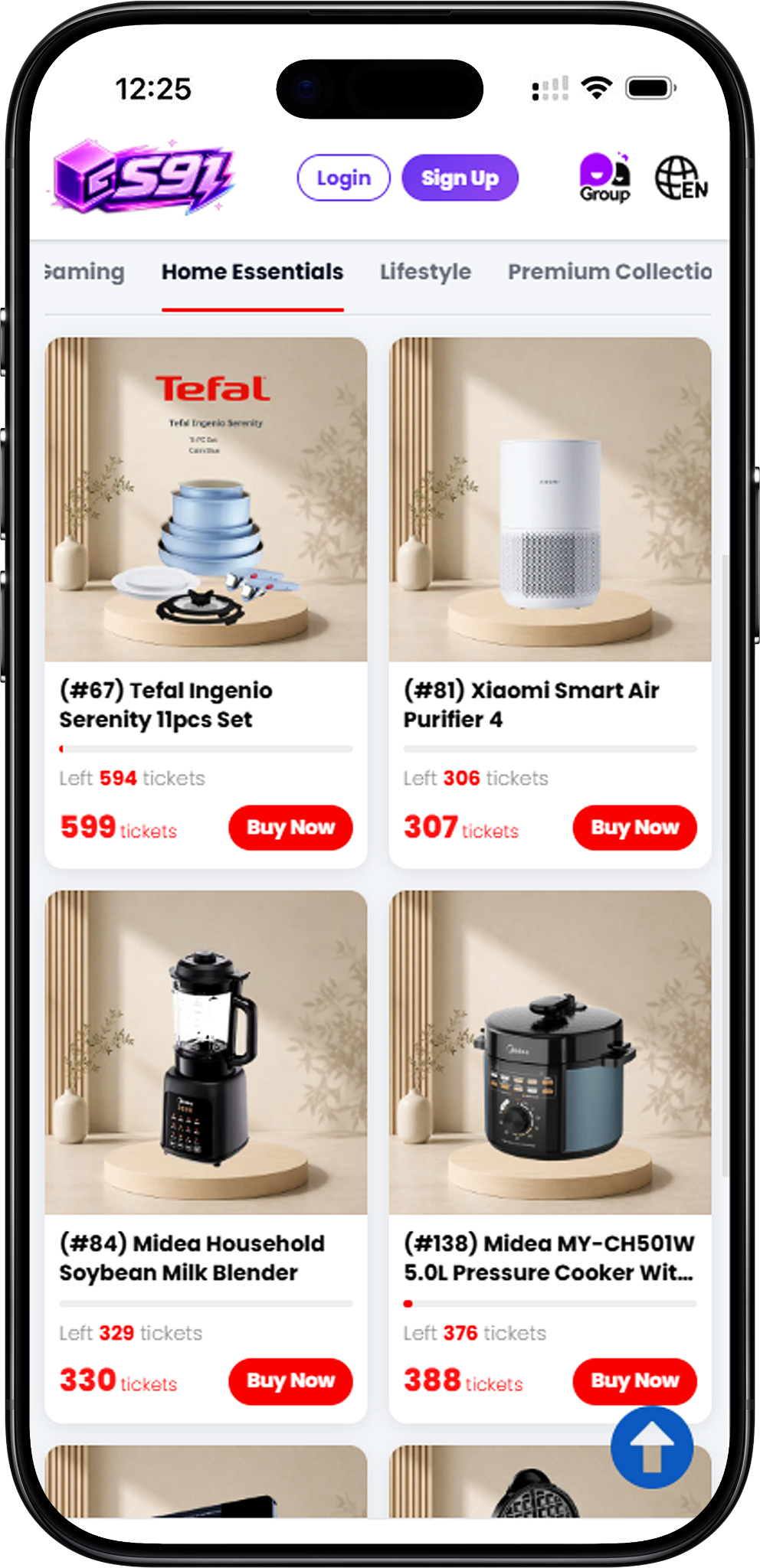
Everyday Home, Kitchen and Cooking Products
The S91BOX RM1 Purchase Home Essentials category focuses on useful household products for different everyday needs. The selection ranges from refrigeration and air purification to cookware, beverage preparation and cooking appliances, giving users a dedicated category for exploring practical home essentials through RM1 Purchase.
Home Essentials Available in RM1 Purchase
Complete S91BOX Home Essentials Selection
The complete Home Essentials RM1 Purchase selection includes (#43) Panasonic 46L NR-AC041ARKM, (#67) Tefal Ingenio Serenity 11pcs Set, (#81) Xiaomi Smart Air Purifier 4, (#84) Midea Household Soybean Milk Blender, (#138) Midea MY-CH501W 5.0L Pressure Cooker With 10 Preset Menus, (#140) Russell Taylors Induction Cooker 2000W IC-10, (#141) Russell Taylors Stainless Steel Belgian Waffle Maker, (#142) Samu Giken Steamer(Multilayer) | Pengukus(Berbilang Lapisan) Model MLS34WT, and (#144) Electrova Classic 50’s Electric Kettle 1.8L | Retro Design | 1.8L Fast Boil | Stainless Steel Body.
Explore Home and Kitchen Essentials
Panasonic Mini Bar Fridge
(#43) Panasonic 46L NR-AC041ARKM is a compact mini bar fridge designed for everyday use. Its product information highlights a separate chiller compartment, mechanical temperature control and adjustable legs, making it suitable for different personal or household spaces.
Tefal Cookware Set
(#67) Tefal Ingenio Serenity 11pcs Set provides a cookware option within the Home Essentials category. Its stackable design is intended to save storage space, while the detachable handle system allows compatible cookware pieces to be used in different ways around the kitchen.
Xiaomi Smart Air Purifier
(#81) Xiaomi Smart Air Purifier 4 adds an air-care product to the RM1 Purchase selection. It is designed for air purification and can be used in household spaces such as bedrooms and living areas.
Midea Kitchen Appliances
Midea products in this category include (#84) Midea Household Soybean Milk Blender for preparing soybean milk, juice, smoothies and other drinks, as well as (#138) Midea MY-CH501W 5.0L Pressure Cooker With 10 Preset Menus for everyday meal preparation.
Russell Taylors Cooking Appliances
The Russell Taylors selection includes (#140) Induction Cooker 2000W IC-10 for countertop cooking and (#141) Stainless Steel Belgian Waffle Maker for preparing waffles at home. Both expand the category with compact cooking appliances for different food preparation needs.
Samu Giken Multi-Layer Steamer
(#142) Samu Giken Steamer(Multilayer) | Pengukus(Berbilang Lapisan) Model MLS34WT provides a multi-tier steaming option. It is designed to steam different ingredients and supports everyday preparation of foods such as vegetables, seafood, meat, buns and eggs.
Electrova Retro Electric Kettle
(#144) Electrova Classic 50’s Electric Kettle 1.8L | Retro Design | 1.8L Fast Boil | Stainless Steel Body combines a retro-inspired design with a 1.8L capacity, fast-boil functionality and stainless-steel construction.
How S91BOX RM1 Purchase Home Essentials Works
Step 1 – Select a Home Essentials Product
Browse the Home Essentials category and open the household or kitchen product you want. Each item has its own RM1 Purchase page where the current product information can be reviewed.
Step 2 – Check the Ticket Requirement
Review the Ticket requirement shown for your selected product. The RM1 Purchase interface displays RM1 / ticket, while the total number of Tickets associated with each Home Essentials item can vary.
Step 3 – Choose the Purchase Quantity
Use the quantity controls to choose the number of purchases you want. Check the selected quantity and the information displayed on the product page before continuing.
Step 4 – Select Buy Now
Select Buy Now after confirming your chosen Home Essentials product and quantity. This takes you to the payment confirmation stage.
Step 5 – Confirm the RM1 Purchase
The confirmation screen displays information including Wallet Balance, the available payment option and the total amount. Review the details before selecting Pay Now to proceed.
Check Home Essentials Product Details
Sold, Total and Remaining
Individual Home Essentials pages show Sold, Total and Remaining figures. These provide a quick way to check the current quantity information displayed for the selected RM1 Purchase product.
Product Description
Each product page contains a Description section with available information about the selected Home Essentials item. Details vary by product and can cover its intended use, capacity, functions, design or other specifications.
Fairness, Authenticity and Delivery
The RM1 Purchase product interface displays 100% Fair, 100% Authentic and Free Delivery information. Users can refer to the individual product page for the information currently shown for their selected item.
Calculation Tutorial
A Calculation Tutorial section is provided on the product interface for users who want to review the calculation information related to RM1 Purchase before proceeding.
Exchange Records and Lucky Winners
Review Exchange Records
The Exchange Records area displays available purchase activity for an individual Home Essentials product. When records are available, users can see the displayed purchase date and number of Tickets purchased.
Check Lucky Winners
The Lucky Winners section is available for reviewing winner information when a completed result is displayed for the selected product. This allows users to check available RM1 Purchase result information directly from the platform.
Get RM1 Purchase Tickets from Season Pass
Earn XP Through Lucky Draw
Participating in S91BOX Lucky Draw allows users to accumulate XP. The accumulated XP contributes toward Season Pass progression.
Claim Tickets from Season Pass
As users progress through Season Pass, available rewards can include Tickets that can be claimed. This connects Lucky Draw XP progression with the RM1 Purchase system.
Accumulate Tickets for Home Essentials
RM1 Purchase products can be purchased using Tickets. Accumulate the required Tickets through Season Pass, then check the Ticket requirement for the fridge, cookware, air purifier, blender, cooker or other Home Essentials product you want before proceeding.
S91BOX RM1 Purchase Home Essentials FAQ
What is S91BOX RM1 Purchase Home Essentials?
S91BOX RM1 Purchase Home Essentials is the RM1 Purchase category for selected household, kitchen, cooking and air-care products that can be purchased using Tickets.
What products are available in S91BOX RM1 Purchase Home Essentials?
The category currently contains nine listed products, including a Panasonic mini bar fridge, Tefal cookware set, Xiaomi air purifier, Midea blender and pressure cooker, Russell Taylors induction cooker and waffle maker, Samu Giken steamer and Electrova electric kettle.
What kitchen appliances are included?
Kitchen-related products include the Midea Household Soybean Milk Blender, Midea 5.0L Pressure Cooker, Russell Taylors Induction Cooker, Russell Taylors Belgian Waffle Maker, Samu Giken Multi-Layer Steamer and Electrova 1.8L Electric Kettle.
Are there Home Essentials products beyond kitchen appliances?
Yes. The category also includes the Panasonic 46L mini bar fridge, Tefal Ingenio Serenity cookware set and Xiaomi Smart Air Purifier 4.
How do I get Tickets for Home Essentials RM1 Purchase products?
Participate in Lucky Draw to accumulate XP, use the XP toward Season Pass progression and claim available Tickets from Season Pass. Accumulated Tickets can then be used for eligible RM1 Purchase products.
Do all Home Essentials products require the same number of Tickets?
No. Ticket requirements can vary by product. Check the requirement currently displayed on the individual Home Essentials product page before proceeding.
Can I check product availability before purchasing?
Yes. The product interface displays Sold, Total and Remaining quantities so users can review the current availability information shown for a selected Home Essentials item.
Can I view previous purchase activity?
Yes. Where records are available, the Exchange Records section displays purchase activity for the selected RM1 Purchase product, including the Tickets purchased information shown by the platform.
Explore S91BOX RM1 Purchase Home Essentials
Browse household and kitchen essentials, check the required Tickets and use your accumulated Tickets toward the RM1 Purchase product you want.